Certamen: Building a TUI Quiz Game Engine in C++
Intro
Motivation
As a university student with examinations around the corner, one grows tired of the same Flashcards and Quizlet decks.For this reason, I wanted something that I could use freely as a Terminal User Interface that paired well with the rest of my dotfiles and respective setup. At a later point, this turned to some rivalry based on points scored on Who knows the most Haskell? (I do!)
After finding and contributing to FTXUI[2] on Github, I decided to develop Certamen (latin: contest)[1].
Scope of This Document
This post traces the full chronological development of Certamen across 105 commits in roughly 5 weeks of development which sprouts off of the initial CLI prototype made back in September 2025 to the current state of the project as of 3rd of April, 2026. This is designed to cover and explain my personal architectural choices, the TUI migration, the SSH server implementation, packaging for multiple platforms, and the refactoring passes that followed.
I: The CLI Prototype, “Quizzer”
The Initial Version
The project began back in 29th September 2025 under the name Quizzer as a single-file CLI application. With a main.cpp worth ca. 300 lines; it used yaml-cpp[3] for quiz serialisation from a top-down mapping sequence with the standard std::cin/std::cout user interaction.
The original data structure worked like so:
1 | struct Question |
Quiz files at this stage were flat YAML sequences with question, choices and answer as mandatory fields:
1 | - question: What is 2+2? |
The main menu was rendered trivially:
1 | static int menu_choice(bool randomise) |
All input was blocking, validated through helper functions such as read_int_in_range, read_line, and read_yes_no to reduce duplications of code. The build system was a straightforward CMakeLists.txt linking yaml-cpp:
1 | cmake_minimum_required(VERSION 3.12) |
While functional, this is not the end product I wanted for this passion project; I decided it would be more of use to others and myself if there were more highlights, options, and a more entertaining interface in comparison to the traditional black and white CLI. Thus, one decides to write a Terminal UI for this, not Graphics!
Pre-Fixes
The idea of making it a TUI was 5 months after the Quizzer app was built in September. Due to this, a few critical bugs were addressed and a few features were implemented by 2026-03-06 to ease the transition:
- Ctrl+D hang: The program would enter an infinite loop on
EOFbecausestd::cinstream state was not being checked. - Score display: The quiz result formatting was corrected, alongside which many optimisations were made.
- Diff before quit: A feature was added to show unsaved changes before exiting, which now developed into a full system to depict differences between
originalandmodifiedstates! - Explanations and code in list view:
List Questionswas debugged to properly print code blocks and explanations inline, while earlier it had issues with sequencing and showing them.
II: The TUI Migration
Decomposition
On 2026-03-06, the centralised main.cpp was split into a header/source structure under src/. This was the first step towards at least some modularity:
1 | src/ |
Every screen reads/writes to a single mutable state object; that being AppState. The reasoning behind the use of a flat state struct in place of a class hierarchy (OOP) was mainly due to the fact that FTXUI components are closures that capture references, and a single owning struct simplifies lifetime management.
1 | enum class AppScreen |
Screen “routing” is implemented through a Container::Tab indexed by the enumeration:
1 | auto tab = Container::Tab(std::move(screens), &screen_index); |
This is a state machine! My favourite! where AppScreen is the state and user input events are the transitions. Each screen is a self-contained FTXUI component produced by a factory function e.g. make_menu_screen(AppState&), and screen transitions are performed by mutating state.current_screen.
FTXUI: The Terminal UI Framework
FTXUI[2] is the rendering engine used for this project. It is useful in many ways:
- Declarative rendering: the
Render()lambda returns an element tree each frame; meaning that FTXUI handles diff-ing against the terminal (emulator). - Component model:
CatchEventwrappers allow composing input handling without subclassing or further abstraction. - Platform compatibility: Linux, and Homebrew (macOS/Windows).
I did not want to move this to more popular alternatives such as
BubbleTeaorLipGloss, etc. since (1) I did not want to switch to a different language and (2) I wanted my code to be (less) indexed by LLMs.
The CMake integration changed from a single-target build to a multi-library link, FTXUI facilitates Make processes by allowing FetchContent:
1 | include(FetchContent) |
FTXUI provides three libraries: ftxui::screen, ftxui::dom for the element tree (layout, borders, colours), and ftxui::component for widgets and event handling.
Screen Implementation
Each screen follows the same pattern. Here is the quiz screen as an example, which demonstrates the rendering of questions with code blocks, choice selection, and answer feedback after which a Renderer is returned to spit it out:
1 | ftxui::Component make_quiz_screen(AppState& state) |
The Renderer wraps a CatchEvent that processes input and mutates AppState. The rendering lambda reads state each frame to produce the element tree (as shown in Line 21 above). FTXUI diffentiates this against the previous frame and emits only the necessary terminal escape sequences.
Now, in what I said above, I used a lot of jargon; what really happens is:
FTXUI sees “Hey! this has changed!” and it goes “Let’s update it and show the user what the program resolved to!”
That is all.
Regardless, this separation of input handling from rendering is what permits the TUI to remain responsive, due to the continous “diffing”[5].
Syntax Highlighting Engine
A bespoke highlighter was implemented in syntax.cpp to render code blocks within quiz questions themselves, this way the user has an easier time parsing the code with their eyes. It supports four language families (Haskell, C-family, Python, Rust) with keyword colouring, string literals, numeric literals, comments (line/block), and operators.
The design is a hand-written lexer that tokenises each line:
1 | enum class Lang { Haskell, CFam, Python, Rust, Unknown }; |
As you must be already familiar by now,
Color::namesignifies a base set colour which most Terminal Emulators support the rendering of! =)
The code block is then rendered with a language label and border:
1 | ftxui::Element render_code_block( |
This is NOT a production-grade syntax highlighter. It does not handle multi-line strings, heredocs, or nested block comments spanning lines. It handles the common cases sufficient for quiz code snippets, and I did not want to add a linter dependency!
III: Name Change
Quizzer to Certamen
On 2026-03-26, the project was faithfully renamed from Quizzer to Certamen. The word is Latin for contest or quiz contest, found via Wikipedia[1].
This was executed across two commits (09ce38b, d4eb31c). One wonders, what is one of the easiest ways to replace this string accross all these files? With sed:
1 | find . -type f -exec sed -i 's/quizzer/certamen/g' {} + |
To explain this, find initially finds all files from the ./ directory i.e. current working directory.
After which, -exec sed -i 's/quizzer/certamen/g' {} + executes sed, which edits each file in place with the aforementioned regex. {} signifies the current file being processed kept in memory, and + groups multiple files together in find.
IV: The New Quiz Wrapper
YAML Schema Evolution
The original Quizzer used a flat YAML sequence as shown earlier, however, when the TUI was built, the schema was wrapped with some metadata. That being name and author; to accomodate for this, previous question were nested inside questions:
1 | name: Certamen DEMO |
The language field was added alongside the syntax highlighter. The Question struct gained it as well:
1 | struct Question |
The QuizFile struct holds the new top-level metadata:
1 | struct QuizFile |
Serialisation uses yaml-cpp‘s emitter API with YAML::Literal for multi-line code and explanation fields shown with how | is used earlier along with this new emitter:
1 | void save_quiz(const QuizFile& quiz, const std::string& filename) |
V: Server Shell
Architecture
The Server Shell (SSH) server mode under option certamen serve was the most architecturally ambitious feature. The design forks a child process per client, connected via a PTY (pseudo-terminal), so that the full TUI renders identically over SSH as it does locally.
The current flow behind-the-scenes:
serve_mainbinds an SSH socket usinglibssh, this is the listener for connections to the server.- connection =>
fork()creates a handler for the client. handle_clientperforms a SSH key exchange, authenticates the user, channel negotiation, and shell requests.forkptycreates a PTY pair and forks again; the child then runscertamen --session(itself) viaexecvpwithout asking client.bridge_ioshuttles data between the SSH channel and the PTY master usingpoll().
1 | // The core I/O bridge goes as SSH channel and PTY master bidirectionally |
The Session Mode
When the server forks a child, it executes certamen --session --metrics /tmp/certamen_metrics_XXXXXX <quiz files>. The --session flag triggers session_main that presents a stripped-down experience, which asks:
- Name: The client enters their display name.
- Picker: If multiple files are loaded, a menu to select one only.
- Quiz: You’re in! The standard quiz screen (mid-game).
- Result: Score display, then return to the picker OR disconnect.
1 | int session_main(const std::vector<std::string>& quiz_files, |
The metrics are written to a temporary file in tmp/ as illustrated earlier. Then read by the parent server process after the child exits, logged to stdout of the actual server, and then cleaned up:
1 | [2026-03-26 20:18:45] METRICS [vanilla]: player=vanilla |
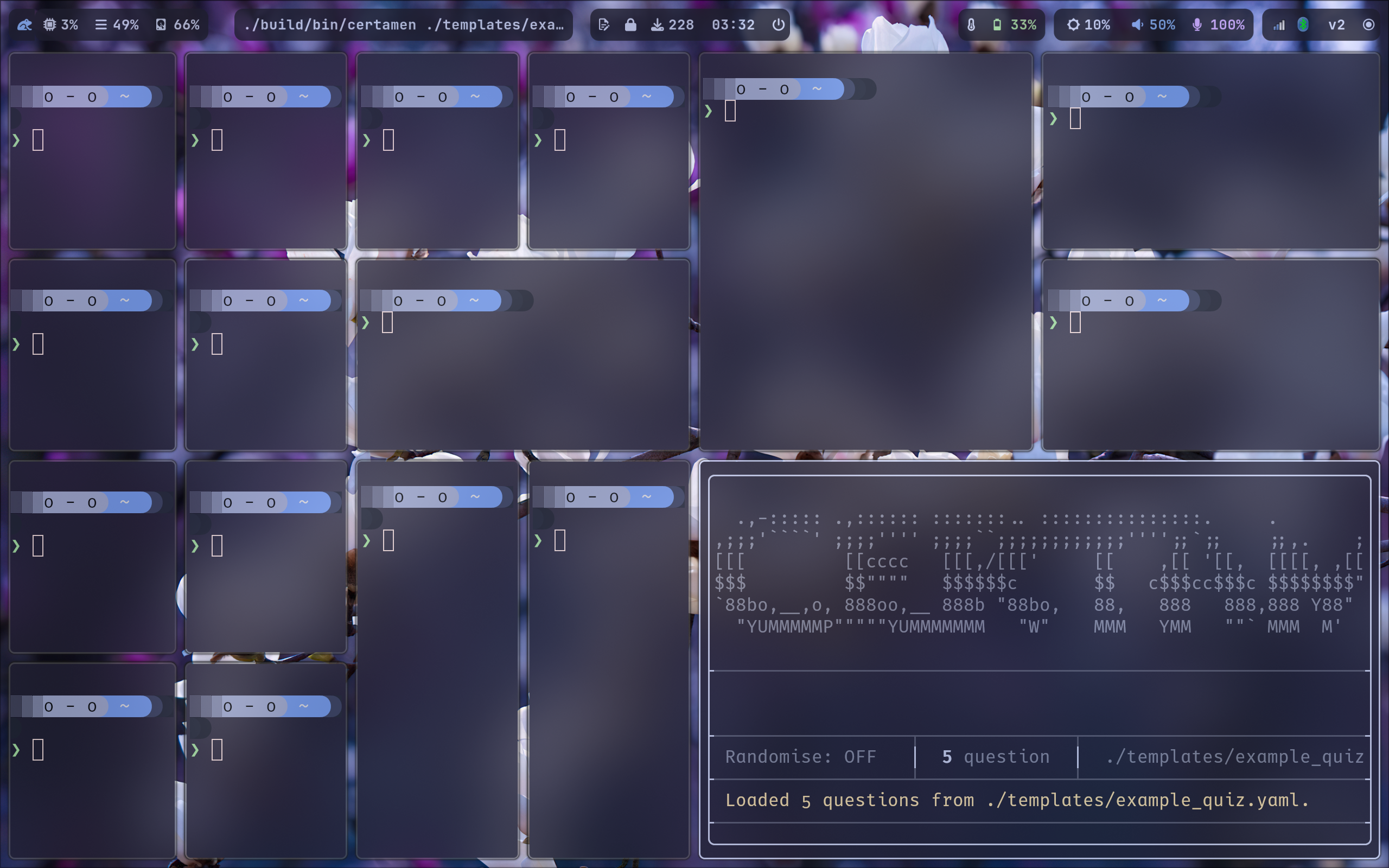
Terminal Resize Handling
Window resize events from the SSH client are sent through a message callback that updates the PTY dimensions:
1 | static int message_callback(ssh_session, ssh_message msg, void* userdata) |
This way, lets say if someone has multiple windows open, if they delete said windows, Certamen comes back! =D
Platform Concerns
The SSH server uses forkpty()[6] which is POSIX-specific. The header inclusion is branched:
1 |
|
This is the primary reason Windows builds are marked as continue-on-error: true in the CI pipeline. The local TUI mode works on Windows; the server does not however.
Authentication
The server supports two authentication modes:
- Open (default): Any SSH client connects without a password. The SSH username becomes the player name.
- Password: Pass
--password <pw>and clients must authenticate, shown below:
1 | # Open |
The host RSA key is auto-generated on first run using ssh_pki_generate and stored as certamen_host_rsa with permissions 0600, that is, sudo (root) can read/write, other users cannot however.
VI: Multi-File Support
The Problem
Initially, Certamen loaded a single YAML file. For a quiz night with multiple topics (say, algebra, history, and most importantly: Haskell), one would need to merge them manually or run separate instances. On 2026-03-28, multi-file support was implemented.
Data Architecture
Each loaded file is tracked by a LoadedFile struct:
1 | struct LoadedFile |
Questions carry a source_file index (-1 for unassigned). The AppState then holds a flat std::vector<Question> with all questions from all files chosen, along with std::vector<LoadedFile> for per-file metadata. This allows source_file to serve as an index to enable per-file saving and editing for each screen to use.
Screen Routing with File Picker
When multiple files are loaded, editing operations (add, remove, etc.) must target a specific file. The route_to method intercepts navigation:
1 | AppScreen route_to(AppScreen dest) |
If only one file is loaded it implies that routing proceeds directly. Else, the user is first sent to a file picker screen, then forwarded to the intended destination. The pick_file_then field stores the deferred target.
Quiz Setup Screen
When taking a quiz with multiple files, the user selects which files to include and in what order in local mode. The QUIZ_SETUP screen has two parts:
- State 0: Toggle inclusion of each file (checkbox-style).
- State 1: Reorder the included files.
The selected questions are then concatenated and fed to start_quiz_from().
One trivially sees that since
Randomisealready juggles around ALL loaded questions and choices, ifRandomiseis enabled, there is no file picker. Perhaps this is unintuitive, and the order of files should still be present? Do let me know!
Unsaved Change Tracking
The diff system compares the current in-memory state against the last-saved snapshot per file:
1 | bool has_unsaved_changes() const |
We do not use the original file due to the fact that the original file may already have been edited mid-session or outside session. As the program has no way to know if this is the case, it saves snapshots instead.
Diff lines are generated with prefix markers [+] for additions, [-] for deletions, [~] for changes in answer/choices, and [0] for no changes, then rendered with colour coding via the shared diff.hpp utility:
1 | inline ftxui::Elements render_diff_lines(const std::vector<std::string>& diff_lines) |
The menu screen displays a modified indicator in yellow when unsaved changes are present.
VII: CI/CD and Packaging
GitHub Actions
On 2026-03-27, a multi-platform CI/CD pipeline was established using GitHub Actions. The workflow triggers on tag pushes (git tag v* && git push origin v*) and builds on three platforms:
1 | jobs: |
The release job depends only on Linux and macOS; Windows is optional because the forkpty-based SSH server cannot compile there as mentioned previously. Releases are created automatically via softprops/action-gh-release.
Few _hot_fixes followed the initial CI setup:
26bd229: Platform-specific headers inserve.cppwere branched (#if defined(__linux__)/#elif defined(__APPLE__)) to fix macOS builds as was shown earlier in Platform Concerscd197e6: CMake presets were added for consistent cross-platform configuration.
Nix Packaging
A Nix flake was contributed by @valyntyler on 2026-03-28, providing reproducible builds:
1 | # flake.nix |
The package derivation:
1 | # nix/package.nix |
This enables imperative installation trivially via:
1 | nix profile add github:trintlermint/certamen#certamen |
Several CMake-related fixes followed to ensure the Nix build found ftxui as a system package rather than fetching it via FetchContent. The CMakeLists.txt was updated to attempt find_package(ftxui QUIET) first:
1 | find_package(ftxui QUIET) |
This is done due to the fact that many consumers of
NixPkgsdo not allow webFetchaccess to programs such asCMakedue to vulnerability concerns.
AUR Packaging
Certamen was published to the Arch Linux User Repository, installable via:
1 | sudo pacman -S certamen |
Or through any other AUR helper/wrapper.
This was natural considering I use Arch Linux, btw!
VIII: Manual and QOL Features
In-Game Manual
On 2026-03-31, a built-in manual screen was implemented. Accessible via option 10 on the menu or by pressing 0, it provides a reference for all features, keybindings, and quiz format documentation without leaving the TUI. Which is seemingly rather helpful for new users! Less README!
Codeberg Migration
The repository has also been mirrored to Codeberg due to concerns about licensing, code ownership, and platform ethics. The README is now embossed with dual badges:


Stance on AI
CONTRIBUTING.md was updated with the project’s stance on AI-assisted contributions, as bearing the brainmade.org mark, this project accepts NO purely “vibe-coded” contributions.
As shown by this “vibe-coded” pull request rejection.

IX: Code Quality and Refactoring
Shared Utility Headers
After the feature set stabilised, duplicated code patterns were extracted into shared headers:
Navigation (nav.hpp)
Six screen files contained near-identical j/k/arrow-binds/1-9 navigation logic. This was pushed into two inline functions:
1 | inline bool nav_up_down(const ftxui::Event& event, int& selected, int count) |
This replaced approximately 100 lines of duplicated code across quiz.cpp, change_answer.cpp, remove_question.cpp, edit_choice.cpp, and list_questions.cpp.
Diff Rendering (diff.hpp)
The diff colouring logic was duplicated between save_confirm.cpp and quit_confirm.cpp. The shared render_diff_lines function shown earlier eliminated this.
AppState Helper
The pattern state.current_screen = AppScreen::MENU; state.status_message.clear(); appeared in 15 locations. It was also lovingly compressed:
1 | void return_to_menu() |
Along with this, several other dead code and typos were fixed which appeared throughout the development process
Reflections
The Flat State Decision
The decision to use a single AppState struct with 40+ fields rather than per-screen state objects or a more structured hierarchy was thoughtful. In FTXUI, components are typically closures capturing references. A single struct means that any given screen can read any state it needs without ownership loop-de-loops! The tradeoff is that AppState is large and its fields are loosely grouped by comments rather than enforced by rigor in types.
For a project of this scale (ca. 4200 lines across 30 source files), this is acceptable. A larger project would benefit from per-screen state structs composed within AppState, or message-passing architecture. The current design was chosen because it permitted rapid iteration during the intensive short term development sprint due to my current examinations.
The PTY Fork Design
The SSH server’s design of forking the entire binary with --session and bridging via PTY is rather unconventional, however effective. The alternative would be to run the TUI rendering in-process and translate FTXUI’s output to SSH channel writes. This would require either:
- A custom
Screenimplementation that writes to an SSH channel instead of stdout, or - Intercepting FTXUI’s terminal output at the file descriptor level.
Both approaches are brittle and couple the server tightly to FTXUI’s internals, making it difficult for someone to contribute openly, or for a system administrator to understand. The forkpty + execvp approach treats the TUI as a “black box”:
Does it work locally? then it must it over SSH. (hmmm . . . .)
The cost is a process per client, which is negligible for the expected concurrency (I dont imagine having a gigantic quiz night with 200 people, yet).
Specifically, there is absolutely no way I am convincing 200 people to play quizzes with me over the terminal.
Conclusion
Certamen began as a 300-line CLI tool for quizzing myself on Haskell functions on my initial quartile 1 exams, and within a few weeks after months, it grew into a pile of 4200-line TUI application with syntax highlighting, multi-file quiz sessions, SSH multiplayer, cross-platform CI/CD, and packaging for AUR and Nix.
The codebase is full of spiky edges. There are NO automated tests which makes Quality Assessment a nightmare; the state struct is more centralised than I enjoy myself; the Windows build is perpetually broken. These are understandable costs for a project whose primary purpose is serving as a personal Free and Open Source utility.
Certamen means contest. The real contest, as it seems to turn out, was finishing this project before the next exam season!
- 1.See the Wikipedia article on Certamen, Latin for contest or quiz competition. ↩
- 2.FTXUI: Functional Terminal (X) User Interface. See ArthurSonzogni/FTXUI on GitHub, version 6.1.9 used. ↩
- 3.yaml-cpp: A YAML parser and emitter for C++. See jbeder/yaml-cpp on GitHub. ↩
- 4.libssh: The SSH library. See libssh.org. ↩
- 5.FTXUI uses a declarative rendering model: the component returns an
Elementtree each frame, and the framework computes the minimal set of terminal escape sequences to update the display. This is conceptually similar to React's virtual DOM diffing. ↩ - 6.The
forkptyapproach was inspired by howttydand similar web-terminal tools expose TUI applications over HTTP/WebSocket by bridging PTY I/O. ↩